All articles
Interconnection3 min read
From Interconnection to PTO: The Steps After the Permit
How a residential solar project moves from utility application to Permission to Operate.
TriventX Engineering Team ·
1. Interconnection application
- Submitted to the utility, usually before installation.
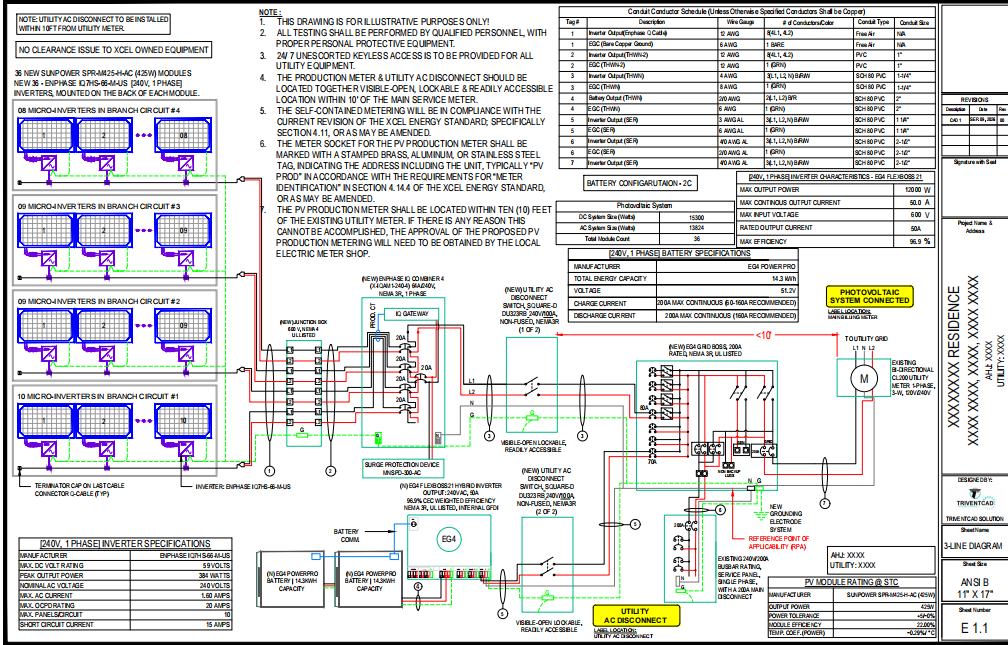
- Typically includes a single-line diagram, equipment specs, and system size.
- Some utilities also need customer signatures or agreements.
2. Utility review
- The utility checks the system against service and transformer capacity.
- It may ask for design changes, an export limit, or an upgrade.
3. Installation and inspection
- Build to the approved plans.
- Pass the AHJ’s final inspection.
- Record any field changes on as-built drawings.
4. Final submission
- Send proof of the passed inspection to the utility.
- Include the final single-line diagram and photos if the utility asks for them.
5. Meter and Permission to Operate
- The utility installs or reprograms a bidirectional meter.
- It then issues Permission to Operate (PTO).
- Don’t switch the system on before PTO.
Avoid delays
- Keep equipment identical across the permit, the application, and the as-builts.
- Match the customer name and address to the utility account.
- Answer utility requests quickly and track every application’s status.
Want us to handle this for you? Send your project for a free quote.
Follow TriventX on LinkedIn
Project updates, code changes, and design tips.